Lab03 Temperature Converter with
Ifs
1.
Quick introduction to the if statement (lab begins at step
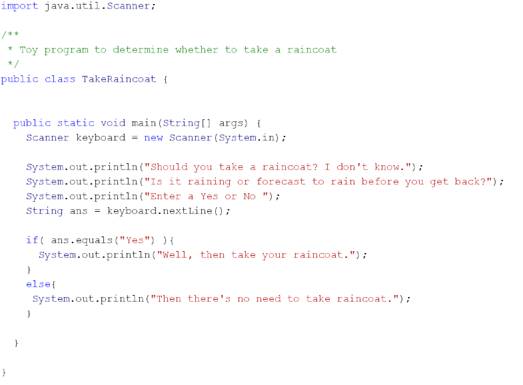
2): Consider the following code which tells you whether you need to take a
raincoat or not.
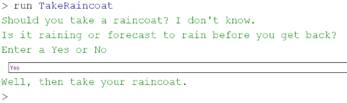
On a “Yes” entered:
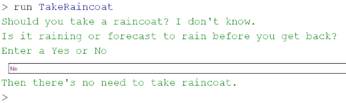
On a “No” or anything but a “Yes”, entered:
Note:
a. The general
structure of:
if(/*test*/)}
{
/*if logic*/
}
else{
/*else logic*/
}
b. The way this
works, as you might suspect, is that the test in parentheses after the if evaluates
to a true or false value. If the test passes, then we do the if logic, otherwise we do the else logic, mutually exclusively.
c. The test, ans.equals("Yes") compares the answer
to the String "Yes", if they are character for character identical,
then it returns true, otherwise false.
d. There are
other versions of the if
statement, one without the else, and
many with more cases, but this basic structure is fine for this lab.
e. The else
happens if the if's
condition evaluates to false.
f.
This is one of the most important programming features in
Java, indeed in many of the related languages, because it is generally useful.
2.
Now write a program that will convert:
a.
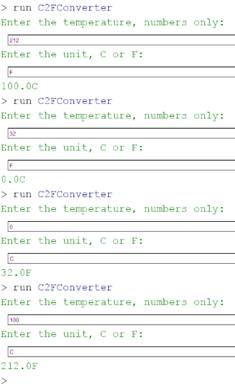
First, let’s see the intended input and output:
b.
Asks the user for the temperature, a number.
Store it in a double variable, e.g.
double temp=keyboard.nextDouble();
i.
double is the type. We've used int, which is, of course, short
for integer.
ii.
keyboard is a Scanner
iii.
doubles are just another
type of value we can use; they store floating point numbers (numbers that can
represent numbers with a decimal or radix point)
c. IMPORTANT: After the previous
step, call keyboard.nextLine(), where keyboard is the Scanner, to clear the input. nextDouble() only reads the line until it has a
number, and no more. There will be some
stuff left over that needs be cleared. We do not store the value returned from
the line in a variable since we do not need it, i.e.,just:
keyboard.nextLine();
d. The program
then asks the user for the unit ,"C" or
"F" (Celsius or Fahrenheit).
e. Then, use the
unit to determine whether it's converting Celsius to Fahrenheit or Fahrenheit
to Celsius. Use the following formulas, where Tc
and Tf are temperatures in Celsius and Fahreheit, respectively.
i.
Tf=(9.0/5.0)*Tc+32.0
ii.
Tc=(5.0/9.0)*(Tf-32.0)
iii.
PITFALL: You need to
include the “.0” after the numbers, otherwise the result of (5/9) will be 1
(integer division in Java returns an integer, which is rounded down here).
f.
Now, test your program. Suggested tests(test both
directions, C<->F):
i.
0C is 32F
ii.
100C is 212F
g. Try to get
the unit for the result on the same line as the converted number.
i.
System.out.println() always adds a new line after printing the input argument.
ii.
System.out.print() won't add the new line automatically.
3.
Upload your
code and make sure you have signed the roll.