Extra Credit 01
Objectives
The student, largely through self-study, will develop an application that calculates grades for CSCE145 using JavaFX.
Not sure where to begin?
Try to do the first two tutorials on Oracle’s site: https://docs.oracle.com/javafx/2/get_started/jfxpub-get_started.htm
Rules
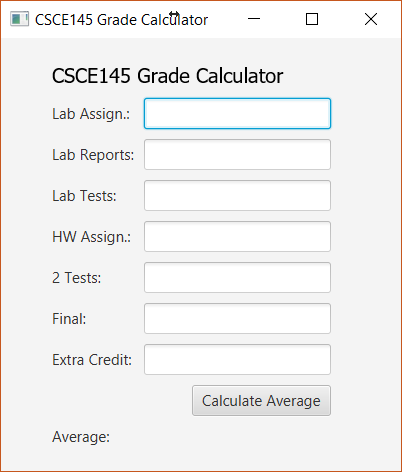
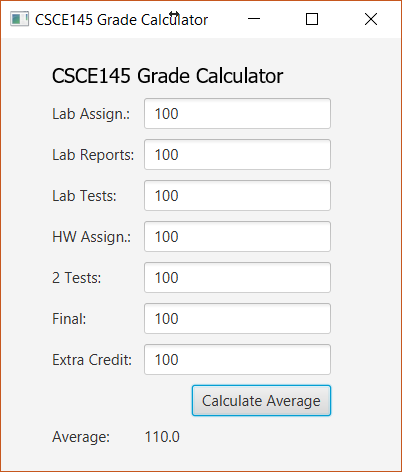
1. It must be mostly correct to garner any credit – showing a graphical user interface GUI like the ones below is 50%, the rest is actually calculating the average and displaying it.
2. It will not be graded if it does not compile or show a GUI.
3. We’re not going to worry about making sure the inputs are valid for this lab.
4. Your interface doesn’t have to be exactly the same.
Notes and Suggestions
· Dr. Java works for this. Eclipse can work, but may require additional work.
· The second tutorial will be quite helpful for this. It has almost all the pieces you need.
· Name your TextFields descriptively.
· getText() on a TextField will give you the text in the text field as a String. There is a setText() for other controls.
· Subtle but important point: GUIs almost always run in a very different manner than regular command line programs. They are event-driven.
o In the code for the button in the HelloWorld example:
Button btn = new Button();
btn.setText("Say
'Hello World'");
btn.setOnAction(new EventHandler<ActionEvent>()
{
@Override
public void handle(ActionEvent event) {
System.out.println("Hello
World!");
}
});
§ The setOnAction() method takes an event handler.
§ The event handler has a method which is what actually does ( “handles”) the event of the button being clicked.
§ https://docs.oracle.com/javafx/2/events/convenience_methods.htm for more information.
· Mine looks like:
|
|
|